Warm Your Designs: The Power of Yellow Wood Textures
There is something undeniably grounding about the look of natural wood. It brings a sense of warmth, history, and organic beauty to any space. In the digital world, we often seek that same connection. That’s where a high-quality digital asset like the Yellow Wood Textures Backgrounds collection becomes a game-changer. If you are looking for inspiration for your next crafting project or a way to add a layer of authentic texture to your brand, this set of digital papers offers a versatile and visually rich solution. It’s about more than just a picture of wood; it's about capturing a feeling and applying it to your creative work.
More Than a Pattern: The Personality of This Texture
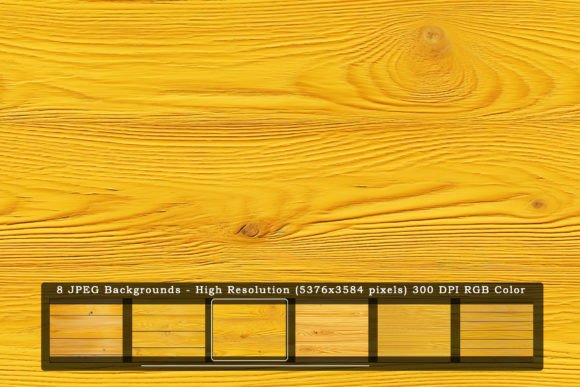
The Yellow Wood Textures Backgrounds are not just a flat, uniform pattern. Each of the included JPGs tells a different story. You’ll find variations that mimic sun-bleached planks, richly grained oak, and softly weathered panels. The color palette is the hero here—a spectrum of warm yellows, honeyed ambers, and soft tans that feel both cheerful and sophisticated. This warmth can make a design feel more approachable and less sterile than a plain white or gray background.
Think about the personality this conveys. It suggests craftsmanship, reliability, and a connection to the natural world. For a brand, using this texture in your brand identity can communicate values of authenticity, warmth, and handcrafted quality. It’s a visual shortcut to telling customers, “We care about the details.” This makes it a powerful tool for businesses ranging from artisan bakeries and boutique coffee shops to eco-friendly product lines and independent publishers. The texture provides a subtle yet strong foundation for your entire visual story.
Practical Applications: Where This Texture Shines
The true value of a design asset lies in its flexibility. This is where the Yellow Wood Textures Backgrounds collection excels. The high-resolution files (a crisp 5376×3584 pixels) mean you can use them for almost anything without losing quality. This is crucial for professional print design, where you might need to create large-format posters, flyers, or even trade show banners. The 300 DPI resolution ensures everything looks sharp and detailed up close.
For digital creators, the applications are just as broad. Here are a few ways you can integrate this texture into your workflow:
- Web Design & Landing Pages: Use it as a subtle background for a website hero section or a product page. It adds depth and interest without distracting from the content, perfect for brands in the lifestyle, food, or wellness spaces.
- Social Media Graphics: Create eye-catching social media graphics for Instagram, Facebook, or Pinterest. A textured background helps your posts stand out in a crowded feed, making them feel more premium and intentional.
- Presentation & Slide Decks: Transform a standard PowerPoint or Keynote presentation. Moving away from a plain background to a warm wood texture can make your data and ideas feel more engaging and memorable for your audience.
- Digital Products & Packaging: If you sell digital planners, printable art, or e-books, using this texture as a cover or page background can significantly increase the perceived value of your product.
- Logo Design & Branding: While not for the logo mark itself, the texture is perfect for creating branded materials like business cards, letterheads, and social media cover images that establish a consistent and recognizable look.
For crafters and hobbyists, the possibilities are endless. Use the files in your digital scrapbooking, as backgrounds for handmade card designs, or as a base layer for photo edits. The included digital paper format makes it easy to incorporate into any graphics editing software you already use.
Integrating Texture into Your Design Strategy
Simply having a beautiful texture isn’t enough; knowing how to use it effectively is key. The goal is to enhance, not overwhelm. A common technique is to use the wood texture at a reduced opacity or blend it with a solid color overlay. This allows you to tint the texture to match your specific brand identity palette while retaining the natural grain and character.
When pairing this textured background with other design assets, consider contrast. A clean, modern sans serif font like Helvetica or Futura can look stunning against the organic lines of the wood. The contrast between the geometric letterforms and the natural texture creates a dynamic and professional visual hierarchy. Alternatively, pairing it with a classic serif font can reinforce a more traditional, established feel. The key is to test different combinations to see what best supports your message.
Think about readability. If you’re placing text over the texture, ensure there is enough contrast. Sometimes, adding a semi-transparent white or dark box behind your text can solve this issue, making the copy legible while still showcasing the beautiful background. This is a practical consideration that separates amateur work from professional editorial design and web design.
Ultimately, this collection of six distinct textures gives you a versatile toolkit. You aren’t locked into one look. You can choose a lighter, more subtle grain for a delicate project or a more pronounced, darker wood for something with more impact. This flexibility is what makes it a valuable addition to any designer’s or creator’s library of premium fonts and assets.
Before you start a project, take a moment to review the included files. The download is a single zip file containing seven high-resolution JPGs, all ready for instant use. The RGB color mode is perfect for digital projects, while the 300 DPI setting makes the files print-ready for most commercial applications. Having this kind of reliable, high-quality asset saves you time and ensures consistency across all your projects, whether it’s a small personal craft or a large-scale commercial campaign.